> For the complete documentation index, see [llms.txt](https://bothelp.hktrpg.com/guide/llms.txt). Markdown versions of documentation pages are available by appending `.md` to page URLs; this page is available as [Markdown](https://bothelp.hktrpg.com/guide/en/trpg-features/trpg-ming-pian-yu-xi-hao-ka-gong-neng.md).
# TRPG Profile & Preference Cards
This page introduces two TRPG character-related web features: TRPG character cards and player preference cards. Both offer full editing, export, and backup capabilities, along with custom styling and
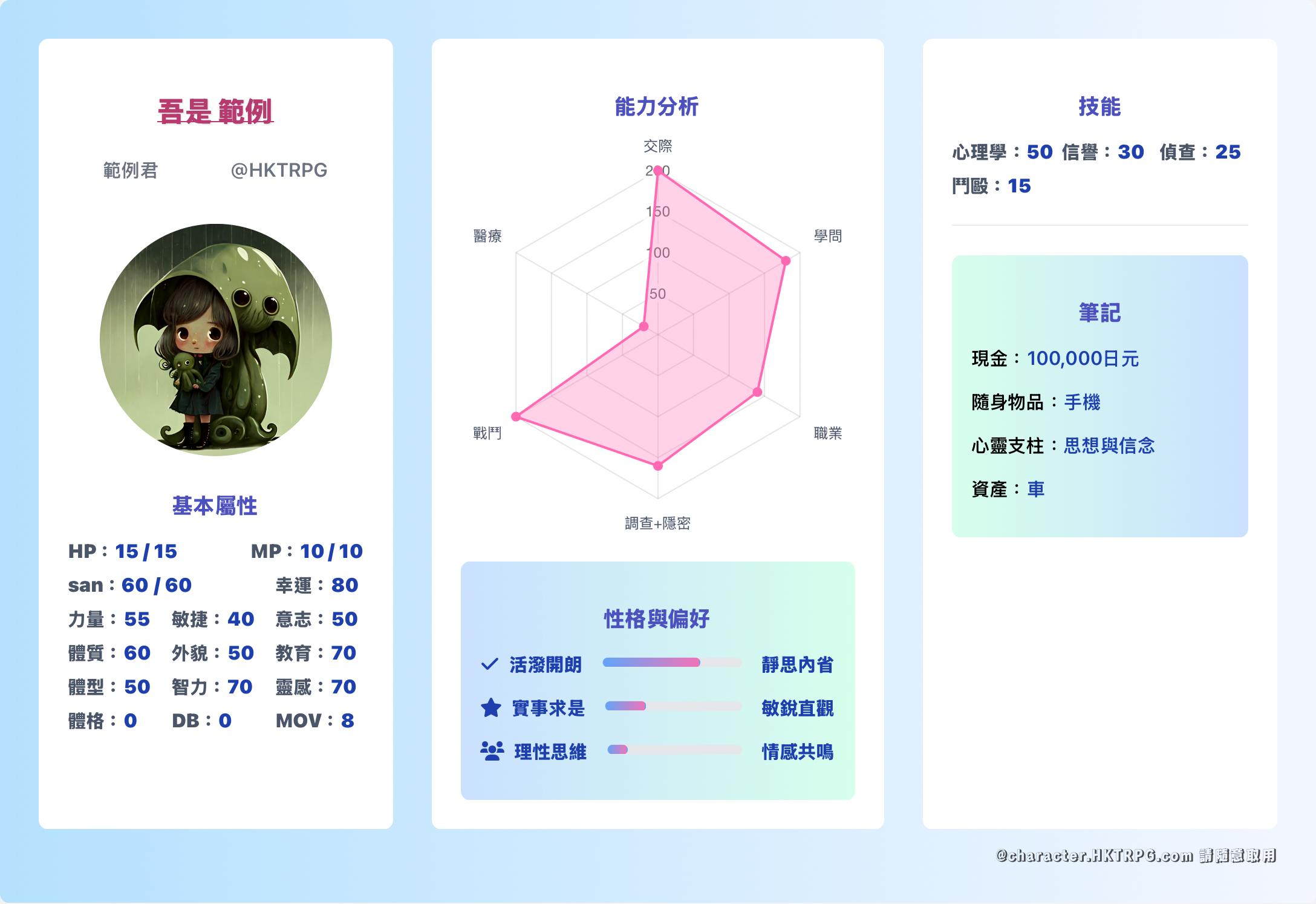
Example Player — TRPG Business Card
### Relation to Bot sheets (`.char` / `.ch`)
| | Web profile / preference cards | Bot sheets (`.char` / `.ch`) |
| ------- | ----------------------------------------------------------------------------------------------------- | -------------------------------------------------------------------------------------------------------------- |
| Purpose | Showcase, pretty share, play preferences | Session rolls, HP/SAN, quick skill checks |
| Entry | [character.hktrpg.com](https://character.hktrpg.com/), [player.hktrpg.com](https://player.hktrpg.com) | Chat commands; editor [card.hktrpg.com](https://card.hktrpg.com/) |
| Linkage | Standalone web tools | Can sync rolls to groups (see [Character Sheets](/guide/en/trpg-features/kai-shi-jin-hang-trpg/jiao-se-ka.md)) |
They complement each other: Bot sheets run the game; profile cards handle presentation.
### `.admin account` for the web sheet editor
For the **Bot-linked** sheet manager ([card.hktrpg.com](https://card.hktrpg.com/)):
1. **DM** HKTRPG (do not post passwords in a group)
2. `.admin account username password`
* Username: 4–16 chars, Chinese or English
* Password: 6–16 chars, letters and `!@#$%^&*`
3. Open [card.hktrpg.com](https://card.hktrpg.com/) and sign in to edit `.char` sheets
character / player sites are separate web apps—use their own UI to register or edit.
### 1. TRPG Character Card (Business Card)
* **URL**:
* **Features**:
* Edit character basics, attributes, skills, notes, and other custom fields
* Dynamic charts and drag-and-drop sorting via Chart.js and SortableJS
* Export to PNG and backup links for easy sharing and saving character data
### 2. TRPG Player Preference Card
* **URL**:
* **Features**:
* Display player avatar, nickname, and other basic info
* Multiple edit modes for play style, platform, relationship roleplay, and more
* Live preview, PNG export, and customizable colors
### After exporting PNG (Discord / LINE)
1. Finish editing on the profile or preference page → export / download **PNG**
2. **Discord**: drag the PNG into a channel, or post it in intro / character channels; for button rolls still use Bot `.ch button`
3. **LINE**: send the image from the album / image picker; group profiles may need re-upload depending on LINE UI
4. Name files with the character name so the table can tell them apart
{% hint style="info" %}
A PNG does not become a Bot sheet. To use `.ch` in a group, still create a [Bot character sheet](/guide/en/trpg-features/kai-shi-jin-hang-trpg/jiao-se-ka.md).
{% endhint %}